<?xml version="1.0" encoding="utf-8"?><feed xmlns="http://www.w3.org/2005/Atom" ><generator uri="https://jekyllrb.com/" version="4.3.2">Jekyll</generator><link href="/feed.xml" rel="self" type="application/atom+xml" /><link href="/" rel="alternate" type="text/html" /><updated>2024-11-03T08:13:43+00:00</updated><id>/feed.xml</id><title type="html">Ivan Sorokin</title><subtitle>Hey! My name is Ivan Sorokin. Welcome to my website!</subtitle><entry><title type="html">Add support for newer iOS versions in Xcode</title><link href="/2021/05/26/add_support_for_newer_ios_versions_in_xcode.html" rel="alternate" type="text/html" title="Add support for newer iOS versions in Xcode" /><published>2021-05-26T00:00:00+00:00</published><updated>2021-05-26T00:00:00+00:00</updated><id>/2021/05/26/add_support_for_newer_ios_versions_in_xcode</id><content type="html" xml:base="/2021/05/26/add_support_for_newer_ios_versions_in_xcode.html"><![CDATA[<p><i style="color: #666">This article is an aggregated knowledge from: <a href="https://developer.apple.com/forums/thread/673131?answerId=661007022#661007022">https://developer.apple.com/forums/thread/673131?answerId=661007022#661007022</a></i></p>

<h2 id="why">Why?</h2>
<p>Usually with a minor iOS version update, say, from 14.4.x to 14.5.x Apple releases new Xcode version as well. In majority of the cases (at least Apple hopes so) people just update Xcode from the AppStore and there is no problem.</p>

<p>Sometimes, though, you can not update Xcode, but you need to use a device with a newer iOS version. Couple of examples when this might happen:</p>
<ul>
  <li>Update to the next version of Xcode requires macOS update and you can not do it.</li>
  <li>Your entire team uses the same version of Xcode and updating to the next version can lead to incompatibility issues, which are highly unwanted at this specific moment.</li>
</ul>

<h2 id="solution">Solution</h2>
<p>The main idea is that support for iOS versions can be copied from newer Xcode to the old one, as it’s just a couple of files.</p>
<blockquote>
  <p>Obviously, this might not work for all the combinations of Xcode &lt;&gt; iOS, because it’s sort of a hack. But it’s worth a try before doing something else way more energy or time consuming.</p>
</blockquote>

<h3 id="1-locate-device-support-folder">1. Locate “Device support” folder</h3>
<p>There is a folder inside Xcode, that holds support for different iOS versions: 
<code class="language-plaintext highlighter-rouge">/Applications/Xcode.app/Contents/Developer/Platforms/iPhoneOS.platform/DeviceSupport</code> (if you are not familiar with Terminal just right click on Xcode, then chose “Show Package Contents” and go to Contents -&gt; Developer -&gt; Platforms -&gt; iPhoneOS.platform -&gt; DeviceSupport). There you would find all the iOS versions your Xcode supports now, when working with real iPhones.</p>
<h3 id="2-find-device-support-files-for-desired-ios">2. Find device support files for desired iOS</h3>
<p>Say, you need to deploy to iOS 14.5, but the latest version supported by your Xcode is 14.4. Then you need to find device support files for 14.5 and copy them to your Xcode. This can be done by multiple ways, but here I’ll provide at least two of them:</p>
<ol>
  <li>If you have a newer Xcode version installed somewhere else (another machine, friends machine, etc.), you can just go to <code class="language-plaintext highlighter-rouge">DeviceSupport</code> folder (the same as in step 1) on that machine and copy the files for needed iOS version.</li>
  <li>There is a <a href="https://github.com/iGhibli/iOS-DeviceSupport/tree/master/DeviceSupport">repository on GitHub</a> with device support files for different iOS versions. 
<em><strong>Disclaimer</strong>: I’m not the author of this repository and I advice to exercise caution if you would download anything from there. I, personally, would prefer the 1st option, whenever possible.</em></li>
</ol>

<h3 id="3-make-this-all-work">3. Make this all work</h3>
<p>After you’ve downloaded device support files for needed iOS version, say for 14.5, you need to put them inside <code class="language-plaintext highlighter-rouge">DeviceSupport</code> folder from step 1. 
After that you need to:</p>
<ol>
  <li>Clean builder folder (in Xcode go to Product -&gt; Clean Builder folder)</li>
  <li>Delete <code class="language-plaintext highlighter-rouge">DerivedData</code> folder (to locate this folder go to Xcode -&gt; Preferences -&gt; Locations).</li>
</ol>

<p>Hopefully this will work for you, at least it did the trick for me :)</p>]]></content><author><name></name></author><summary type="html"><![CDATA[If you need to use an iPhone with iOS version higher, then your Xcode supports and you can not upgrade it - there is a solution, which might help you.]]></summary></entry><entry><title type="html">How I failed to hack my sleep</title><link href="/2018/10/17/how_i_failed_to_hack_my_sleep.html" rel="alternate" type="text/html" title="How I failed to hack my sleep" /><published>2018-10-17T00:00:00+00:00</published><updated>2018-10-17T00:00:00+00:00</updated><id>/2018/10/17/how_i_failed_to_hack_my_sleep</id><content type="html" xml:base="/2018/10/17/how_i_failed_to_hack_my_sleep.html"><![CDATA[<p>Sleep is essential for a human. We spend around one-third of our life sleeping. Why not try to know a bit more about it?</p>

<p>People often write about their success, and it’s really cool. This article would be different, though.</p>

<h2 id="preface">Preface</h2>

<p>Five weeks ago I started <a href="https://www.coursera.org/learn/machine-learning">the fantastic Machine Learning course by Andrew Ng on Coursera</a>. Soon I’ve learned a linear regression, and since then it was tempting to apply it somewhere outside of the course. Another important thing for this story is that around a year ago I’ve bought a SmartWatch with sleep tracking functionality.</p>

<h2 id="the-idea">The Idea</h2>

<p>Two previous facts have melted together into the idea: why not to create a formula for my sleep? I wanted to know what is the perfect time to go to bed and how much ideally, should I sleep? Also, if I fell asleep later - how much more I need to rest to catch up? Is this dependency linear, quadratic, cubic or something else? I was eager to get answers to all these questions!</p>

<p>To measure how good my sleep was I chose relation of deep sleep to total time in bed. If I would find a function, which by <code class="language-plaintext highlighter-rouge">In bed at</code> time and <code class="language-plaintext highlighter-rouge">Duration</code> time can predict this relation - I would only need to find the maximums.</p>

<div class="language-plaintext highlighter-rouge"><div class="highlight"><pre class="highlight"><code>x1 = In bed at
x2 = Duration of sleep
y = deep sleep / total sleep
f (x1, x2) = y
</code></pre></div></div>

<p>Why only two parameters? Because the chart would be 3D and I could observe these maximums visually without trying to find them programmatically. Latter could be hard because the function can have multiple extremums.</p>

<h2 id="math">Math</h2>

<p>One of the exercises during the course was similar - you have two variables, value and you need to find a function that predicts the value for arbitrary data. I wanted to reuse the code, so I’ve arranged my sleep data to exact the same format from this exercise. Also, I did some filtering, and after all of this, I had around 300+ data records in the following form:</p>

<table>
  <thead>
    <tr>
      <th style="text-align: center">In bed at (minutes after 22:00)</th>
      <th style="text-align: center">Duration (minutes)</th>
      <th style="text-align: center">deep sleep / total sleep</th>
    </tr>
  </thead>
  <tbody>
    <tr>
      <td style="text-align: center">60</td>
      <td style="text-align: center">480</td>
      <td style="text-align: center">0.35</td>
    </tr>
    <tr>
      <td style="text-align: center">120</td>
      <td style="text-align: center">420</td>
      <td style="text-align: center">0.2</td>
    </tr>
    <tr>
      <td style="text-align: center">…</td>
      <td style="text-align: center">…</td>
      <td style="text-align: center">…</td>
    </tr>
  </tbody>
</table>

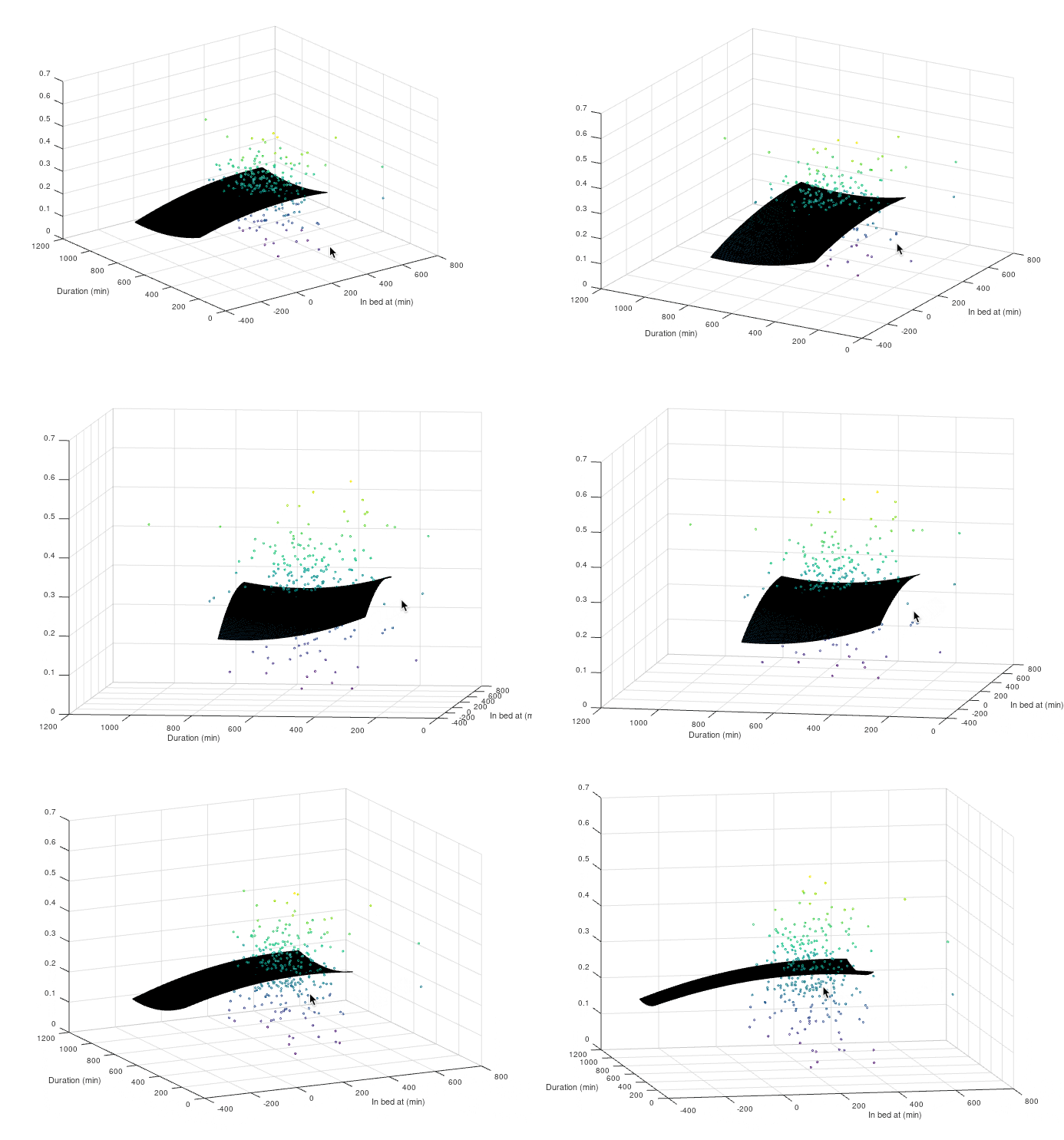
<p>I pointed the code to my sleep data file and pressed “Enter”. I was waiting for some “nice” function. Well, guess what, I did not get one. I plotted data points together with the prediction function chart, and they were like a swarm, not a surface of some shape (colorful bubbles on the picture below).</p>

<p><img src="/assets/sleep.gif" alt="Alt Text" />
<em>Duration in minutes. In bed at in minutes after 22:00</em></p>

<p>I think in these circumstances, no proper linear prediction function can be found, but I still have tried different powers of polynomial and played with some coefficients. One of these attempts you can see on the image above (dark coloured surface). But all of these did not solve “the sleep formula” for me.</p>

<h2 id="caveats-of-my-experiment">Caveats of my experiment</h2>

<p>Deep sleep to total sleep relation, probably, is not the right way to measure the quality of sleep.</p>

<p>Data from my SmartWatch could be really noisy.</p>

<h2 id="conclusion">Conclusion</h2>

<p>I have not found the correlation I was looking. But, what if, there should not be one? Because of other factors, like sport, stress, alcohol and so on influence sleep as well and I did not encounter them in my function. Probably, an absence of the correlation was an even better result, that I hoped. Now I can say, that one cannot determine the relation of deep sleep to total sleep by only these two factors.</p>

<p>Sleep is complicated. I’ve tried to “hack” it and failed, but I’m happy that I’ve done this and I would do it again in the future with some more skills and knowledge applied.</p>

<p>Sleep well. Eat fruits and vegetables!</p>]]></content><author><name></name></author><summary type="html"><![CDATA[Sleep is essential for a human. We spend around one-third of our life sleeping. Why not try to know a bit more about it?]]></summary></entry></feed>